FAQs
Where can I find out more information about Business Stream?
You can find out more information about Business Stream on our About Us webpage or please speak to your Account Manager.
I didn’t receive my welcome email and Welcome Pack, when I joined the Framework. What should I do?
Please get in touch with your Account Manager to arrange for the welcome email and Welcome Pack to be sent to you. Alternatively, please email framework2024@business-stream.co.uk.
My Site List isn’t quite right, how do I amend it?
Please amend the Site List provided to you in your welcome email along with completing the Options Form and return it to framework2024@business-stream.co.uk. The Options Form includes instructions on how to flag errors and omissions in your Site List.
I am joining the Framework but have existing accounts with Business Stream. What will happen with my other accounts?
We’ll ensure that you keep your existing accounts and account numbers.
I’m not sure how to request a transfer. Where can I find more information?
If you have signed an agency agreement with Scottish Procurement, we’ll have sent you a welcome email which includes a Welcome Pack containing details about how to transfer. If you're still unclear, please send an email with your questions to framework2024@business-stream.co.uk. If you haven't received your welcome email and Welcome Pack, get in touch with your Account Manager or, if you don’t have an Account Manager yet, please email framework2024@business-stream.co.uk.
How do I arrange a site new connection or disconnection?
We’ve developed an end-to-end connections assistance service to make managing new connections and disconnections effortless. This service is included free of charge under this Framework.
To find out more or request a new connection or disconnection, visit our New Connections page, or email newconnection@business-stream.co.uk.
I’d like to find out more about the Framework, where can I find more information?
Your Welcome Pack and our dedicated Public Sector Scotland web pages explain more about the Framework. If there’s something you’d like to know that isn’t covered, please send an email with your questions to framework2024@business-stream.co.uk.
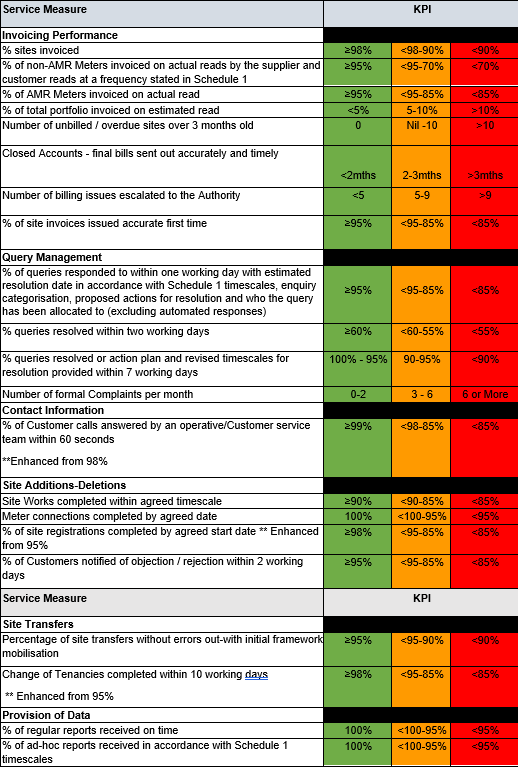
What are the new framework Key Performance Indicators (KPIs)?
For the new Framework, which commenced on 1 April 2024, we committed to the following enhancements:
- answering 99% of calls within 60 seconds (Sch.2 KPI 98%)
- registering 98% (Sch.2:95%) of new site requests by the Supply Start Date, and
- processing 98% (Sch.2:95%) of change of tenancy requests within 10 working days.
We’ve included a full list of KPIs in the table below:
My sites have Trade Effluent. Will Business Stream be able to help me with that?
Yes, your Account Manager and a team of experts are on hand to support all your Trade Effluent requirements. Please get in touch with your Account Manager or email framework2024@business-stream.co.uk if you don’t yet have an Account Manager.
What else can Business Stream do to help my organisation’s water efficiency?
We’re committed to continuing to work with you to contribute towards achieving the Scottish Government’s 2045 Net Zero targets. Water efficiency is one of our key focus areas for this Framework including how we’ll support our Scottish Public Sector customers to use water more sustainably and reduce their overall consumption where that’s possible. You can find more details on how we can help in the Welcome Pack, on our Public Sector Scotland web pages or speak to your Account Manager who, with support from our expert Solutions team, will be happy to help. If you don’t yet have an Account Manager and want more information, please email framework2024@business-stream.co.uk.
I’d like to speak to a person. Who can I call?
If you’ve got questions about the Framework, your Welcome Pack and our dedicated Public Sector Scotland web pages explain all the details. If there’s something you’d like to know about the Framework that isn’t covered, please send an email to framework2024@business-stream.co.uk or speak to your Account Manager.
PSS customers can get in touch with us at any time over the duration of the Framework via several channels, including:
Email: publicsector@business-stream.co.uk or email your Account Manager directly.
Dedicated Public Sector Scotland phone line: 0330 123 2003
Log in to My Business Stream: business-stream.co.uk/mbs
24/7 emergency line: 0330 123 2100
Framework website: business-stream.co.uk/publicsectorscotland.
What are the annual charges and when will I be notified of them?
We will communicate the annual wholesale and retail charges to you before the start of each financial year once they have been confirmed by Scottish Water (wholesale charges) and WICS (default retail charges). In your welcome email, we provided a cost forecast for your sites covering the upcoming financial year. If you need any additional information, please get in touch with your Account Manager who will be happy to help.
How do I find out more about the different billing formats available?
Your Welcome Pack explains the different billing formats available.
Our standard billing format is monthly calendar consolidated eBilling. You'll receive a single monthly consolidated statement in a PDF format and separate individual invoices for each account. You'll also receive a detailed monthly consolidated breakdown in several formats including EDI Tradacoms, XLS or CSV. For faster processing, all bills have an easy to read layout and itemised line items for each charge type. eBilling via our online account management portal, My Business Stream, is provided as standard.
Your monthly consolidated bill will include all sites. Unmetered and vacant sites will be billed monthly in advance and metered sites will be billed monthly in arrears.
If you need any additional information, please email us on framework2024@business-stream.co.uk.
What payment options do you offer?
Please navigate to our Payment options webpage for all the information you need.
Business Stream offer Annual Payment in Advance (PIA), but I recall the previous limit set by the WICS was a maximum of three months. Why has this changed?
The three month advanced payment limit has been removed by WICS for those Licensed Providers who signed up to WICS voluntary standard licence conditions on financial resilience and customer support measures. We’ve signed up to both of these voluntary licence conditions which means we can offer flexible, attractive tailored pre-payment arrangements to all PSS customers to provide additional savings.
We remain the most financially resilient Licensed Provider in the market. To provide added assurance on the protection of any advanced payments, you can opt to change your preferred payment option at any time during the Framework contract by simply providing 30 days’ notice of your new preferred payment option.
For consolidated billing, what date will Direct Debits (DDs) be collected?
Direct Debit payments will be collected around the 21st of each month. We have included a Direct Debit mandate in the welcome email. If you didn’t receive the welcome email please speak to your Account Manager who will be happy to help. If you don’t yet have an Account Manager, please email framework2024@business-stream.co.uk.
How often will Business Stream read the meters?
We’ll read your meters in line with the market code, which is that 80mm and above meters will be read monthly, and all other sites will be read twice annually. It is our responsibility to read the meter and your responsibility to ensure we have access to do so.
What is my year-to-date (YTD) consumption and where can I find it on my bill?
If you’re a metered customer, your year-to-date (YTD) consumption figures will be shown on your bill. Your YTD consumption figures show the amount of water you’ve used in the year from 1 April to date and this figure can be viewed on the first page of your bill in the ‘Your water consumption and carbon emissions’ module. You’ll also find a further breakdown of your YTD consumption for your water and waste water supplies on the last page of your bill in the ‘More information’ module.
What is my rateable value (RV) and where can I find it on my bill?
The Rateable Value (RV) relates to RV based charges including drainage charges and unmetered charges. Your RV, which is shown on the last page of your bill in the ‘More information’ module, is the rateable value of your premises and you can find out more about how this is calculated on the mygov.scot website.
What emergency support is available to my organisation?
You have 24/7 access to our free of charge emergency support service; you can access this by calling 0330 123 2100. The Account Manager on standby will provide advice and services to assist with issues, whether on your network or involving Scottish Water. This service is available regardless of whether the site is classed as sensitive or non-sensitive.
What is My Business Stream?
My Business Stream is our online account management portal that lets you access management information and service your account 24/7. You can also access your bills, Site Lists and meter reads, along with our Intelligent Water Management monthly reports. If you’d like more information or need any help, please get in touch with your Account Manager or email framework2024@business-stream.co.uk if you don’t yet have an Account Manager.
Can I service my account online?
You can use My Business Stream, our online account management portal, to access management information and service your account whenever it’s convenient for you. You can also raise any enquiries and complaints through My Business Stream if necessary. If you’d like more information or need any help, please get in touch with your Account Manager or email framework2024@business-stream.co.uk if you don’t yet have an Account Manager.
I want to monitor my water consumption and costs; can I request a report?
Online interactive reports offer you visibility of your water consumption, costs and carbon emissions. You can access interactive reports on your My Business Stream account - giving you a 360° view of consumption at your site(s). Your Account Manager will review these reports and use them to proactively manage your portfolio.
What reports will I have access to?
You have access to a suite of interactive reports through your My Business Stream account. Reporting includes:
- consumption information
- consumption forecasting
- high consumption alerts
- costs to date
- cost forecasting
- notifications of planned and unplanned works
- carbon emissions
- benchmarking of consumption data to identify any anomalies
- our Intelligent Water Management interactive dashboards
- trade effluent data
Your Account Manager will review these reports and use them to proactively manage your portfolio.
How can I upload bulk meter readings on My Business Stream?
You can upload bulk meter readings for multiple sites by navigating to the ‘Manage account’ section in the left-hand menu of your My Business Stream (MyBS) dashboard. If you need support, you can find out more about uploading your bulk meter readings by viewing the recording of our webinar ‘A closer look at the MBS enhancements’ found in the Useful Resources Library. Here you can also view our handy My Business Stream User Guide, which provides more information about uploading bulk meter readings too or, please get in touch with your dedicated Account Manager who will be happy to help.
What are the X and Y coordinates related to my water meter and where can I find them?
The X and Y coordinates related to your water meter help you to identify the specific location of your meter. You can view your specific meter information by selecting ‘Sites’ in the left-hand menu of your My Business Stream dashboard, selecting the ‘Meters’ tab at the top of the page and selecting the specific meter you would like to view summary details for. Your X and Y coordinates for each meter will be shown as a map on your meter summary page.
What can I buy from the online water efficiency shop and where can I access it?
Using our online water efficiency shop, you can benefit from a range of discounted water efficiency products for your business including tap aerators, water reduction cistern Hippos, and pipe insulation. You can install most of our water efficiency devices yourself without the need for specialist equipment or plumbing experts. To access our range of water efficiency products, simply select ‘Online shop’ on the left-hand navigation menu of your My Business Stream dashboard.
Where can I view any planned or unplanned water works in my area?
We’ll provide notifications on My Business Stream to let you know of any planned or unplanned water works in your area. If there are any new notifications, a banner will be visible at the top of your MyBS dashboard. By selecting the banner, or ‘notifications’ in the left-hand side menu, you’ll be able to view more details about the planned and unplanned works in your area including the purpose of the works, as well as beginning and end dates for the project.
Can I track my open queries?
Yes. In addition to open and closed query notices on your My Business Stream account, you can now track the progress of your open queries, which will include status updates and notes from beginning to end, so you’ll know exactly which stage your query is at with the click of a button. To track your open queries, select ‘Cases in the left-hand menu of your My Business Stream dashboard.
What benefit do Automated Meter Readers (AMRs) give me?
Automated Meter Readers (AMRs) give you more accurate billing by reducing estimated reads and the need for site visits by automatically taking the read and sending the information to us. We then use this data to calculate your bills based on actual consumption. They also capture water use every 15 minutes so leaks and high consumption can be identified quickly and easily.
Do you offer free AMRs on the Framework?
On the current Framework, we provided free AMRs for meters that are 30mm and above. If you have a query about this, please get in touch with your Account Manager.
Where can I find more information on AMR charges and other value added services?
Take a look at our Ancillary Services rate card here. We also included a copy attached to your Welcome email. Your Account Manager will also be happy to help or, if you don’t yet have an Account Manager, please email framework2024@business-stream.co.uk.
I want AMRs for my smaller sites. How can I arrange this?
We’re offering discounts on meters smaller than 30mm so please get in touch with your Account Manager who will be happy to help (or email framework2024@business-stream.co.uk if you don’t yet have an Account Manager).


We’re fully committed to improving our environmental performance and are certified to ISO 14001:2015. You can find out more in our environmental policy. Our Solutions team are certified to ISO 9001:2015 and ISO 45001:2018.